You have the idea. Build the app yourself.
I am Ashley, a working esthetician. I built SlickChart, the app I run my own practice on, with Claude. I had no coding background. I did it between clients. This is the exact roadmap I used, written so it works for any kind of business: your idea, your customers, your rules, in an app that you own and can change whenever you want.
Run a beauty business? There is a version written for your trade, with prompts for deposits, fills, consent forms and patch tests. See the Beauty Biz App Build Roadmap →
- The Master Build RoadmapEvery step in order, from your first prompt to a live app people can open and add to their home screen, with the business, the brand and the launch running alongside it. It saves your progress.
- Every prompt, already writtenEach one sits on the step it belongs to, fills in with your app's name, who it is for and the one job it does, and tells you where to paste it.
- A 22 minute walkthroughMe, showing you how to use it and what not to get wrong.
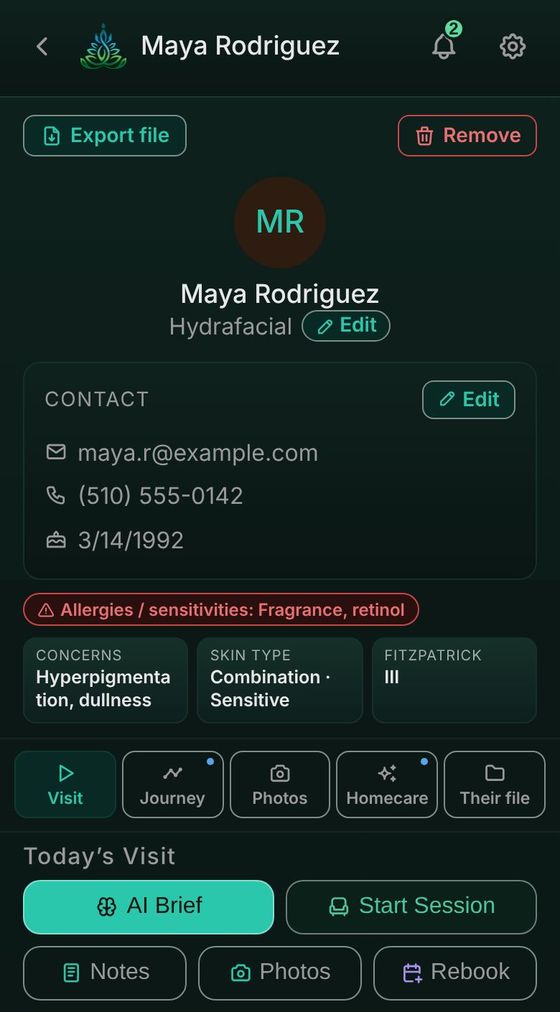
SlickChart, the app I built for my own practice. Shown with sample clients.
The code is not the hard part anymore. The order is.
You have had the idea for a while. Maybe it is a tool your customers keep asking for, or the software you pay for every month that never quite fits how you work.
Claude can write the code now. What it cannot do on its own is tell you what to do first. Some steps wait on other people. Some only work if something else is already in place. Do them in the wrong order and you lose weeks, or build something twice.
Four things run at the same time
Building the app is only one part of putting an app into the world. The roadmap runs four tracks side by side, ordered so nothing blocks anything else.
Build
- The app itself, from a clickable demo to a live app with sign-in, saved data and payments if you need them.
Business and money
- The paperwork and getting paid, started early, because some of it waits on other people.
Brand and stores
- How it looks, your name, your icon, and the app stores if you choose them.
Launch
- People finding out, from one person testing it to your landing page and a weekly blog.
There are two finish lines, and you choose. The first is a live web app people can open and add to their home screen. The second is the app stores, which is optional. Everything before that choice is the same either way.
One of them, word for word
I am building {your app} for {who it is for}. The one job it does is {the job}.

I have made a Claude Project for this app. Help me set it up properly.

Tell me exactly what to put in the project knowledge so every future chat already understands my app, and what I should NOT put in there. Then write me a short project description I can paste in.
You copy it, you paste it, and you check what comes back. The roadmap puts it on the step it belongs to.
I am not a tech person. I am the one with the clients.
I needed my client notes, photos, forms and homecare plans in one place that worked the way my room works. Nothing I paid for did all of it. So I built it, at night and between appointments, with Claude doing the code and me deciding what it should do.
I could not afford to do anything twice. So before each step I looked it up until I was sure. That turned into thousands of hours of research and testing, and then into this roadmap.
You do not write code. You describe what you want in plain words, you copy and paste what the roadmap gives you, and you check that it works. The skill you need is the one you already have: knowing exactly what your app should do for the people who use it.
If I could build mine, you can learn to build yours.
Your app changes the day your business does
Software you rent changes when its company decides to. Your own app changes when you decide to.
New service? New price? Your customers keep asking for the same thing? You describe the change in plain words, Claude makes it, and you check it.
The roadmap ends with the prompts you keep using for that, and agents that keep your app running: a daily check, a weekly feedback summary, and a monthly look at renewals and store rule changes.
What you give up when you own it
Owning your app is a real trade. Here is the other side, before you buy, not after.
What you give up
- Someone else fixing it. If something breaks, you and Claude fix it. The roadmap has a prompt for exactly that, but it is your job.
- Some of your time. Building it takes weeks, at your own pace, and it needs a little care after.
What you get
- Your rules. It does what your business needs, not what suits every business.
- Your data, all of it. Every record is yours to keep, back up and take anywhere.
- Costs you can see. Your running costs are the plain ones listed below.
The right prompt is the hard part. I did it for you.
Anyone can type a request into Claude. Getting back exactly what you wanted is the hard part. It comes down to the prompt: what to ask, how to word it, what to tell Claude not to touch, and which one comes first. I put thousands of hours into working that out on my own app.
So you skip it. Every prompt that worked is here, in order, with exact directions: where to paste it, what you should see come back, and what to check before the next step. You copy, you paste, and Claude does the work with you.
It is one live page you work inside. You tick steps off, it remembers where you got to, and a short walkthrough video shows you how to start.
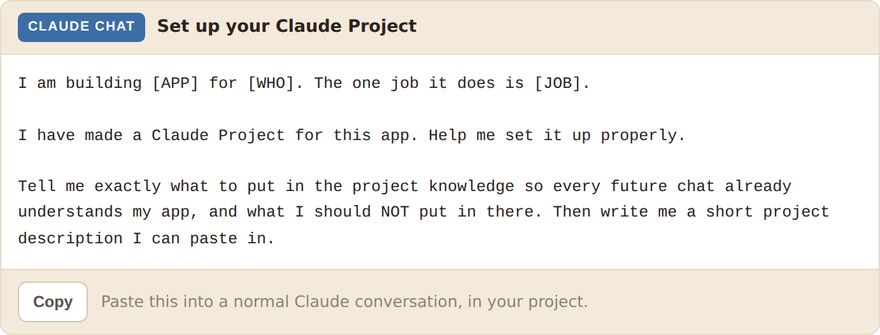
Every prompt says where it goes, and has a copy button.
Everything, on one page, for $97
The Master Build Roadmap
Every step, plus an ongoing section. One page that lives in your own Claude account and is yours to keep.
- Every step, one after the other, with a box to tick.
- Four colour tracks, so nothing gets forgotten.
- Optional steps clearly marked.
- Your progress saves on its own.
- Print it if you like paper.
The prompt library
Built into the steps. Not handed to you as a separate list you have to work out how to use. Getting each prompt to make exactly the right thing, and in the right order, is where those thousands of hours went, and a prompt run in the wrong week is what costs people a month.
- Fills in with your app name, who it is for and the job it does.
- Labelled Claude Chat or Claude Code.
- A copy button on every one.
- A prompt builder for anything new: fill in the boxes, copy the result.
- All gathered in one place too, for when you know what you need.
The 22 minute walkthrough
Me, walking you through the page and the few things that are easy to get wrong.
- How to set the roadmap up and keep it.
- Claude Chat and Claude Code, and why it matters.
- Why the app stores are optional.
- Exactly what to do first.
The whole build, week by week
The weeks show the order, not a deadline. Go at whatever pace your life allows.
Set it up, and design it before you build it
Your accounts, a Claude Project for your app, the questions that decide what it needs, and a clickable demo before any real code.
Make it real and put it live
Claude Code and GitHub set up once, standing rules so Claude changes only what you ask, and your app online.
Put something real underneath it
A database if your app needs one, your keys kept out of the code, a health check, and payments if you charge.
Test it properly, then show one person
Claude tests every screen and tries to break it, you fix one thing at a time, your privacy policy goes live, and one real person tries it.
Brand it, and make it installable
Your look, your icon, and the pop-up that shows people how to add it to their home screen. This is the first finish line.
The app stores, only if you want them
Marked optional, because for many businesses it is.
Handle the reviews, then launch
Store reviews if you went that way, then launch day: one post, one link, one instruction.
Get found, and keep it running
Your landing page, a weekly blog helper, and agents that watch your app for you.
The step people find out about too late
Start the paperwork while you build, not the week you need it
If you want Google Play, registering as an organization skips a testing rule that otherwise holds up your first release. That registration needs a D-U-N-S number, and getting one waits on someone else.
So the roadmap has you request it while you are still building, weeks before the stores. By the time your app is ready, it is waiting for you. That is this whole thing in one example. Not the code. The order.
Who this is for
This is for you if…
- You already have an idea for an app, for your business or your customers.
- You have never written code and you do not want to learn a language.
- You would rather follow a checklist than look all of this up yourself.
- You can find a few hours a week.
This is not for you if…
- You are still looking for an idea. This helps you build one, not find one.
- You want someone to build it for you. You still do the work.
- You want live calls or a group. There is neither, on purpose.
- You want a promise about money. Nobody can give you that.
What building your app actually costs
Not what this costs. What your build costs, so you can decide before you spend anything. Most of it is free, optional, or only matters if you go to the app stores.
| What | Cost | When |
|---|---|---|
| Claude, paid plan | $20 to $100 a month | Day one, for the full build. This is your real cost. (The free starter does not need it.) |
| GitHub | Free | Never, for what you need. |
| Vercel hosting | Free, then about $20 a month | Free while you build and test. Its free plan is for personal use, so once your business runs on your app, you need the paid plan. |
| Database | Free to start | Only if your app has to remember things. |
| Stripe | % per sale | Only if you charge, and only when money actually moves. |
| Domain name | $12 to $20 a year | Optional. The free address works fine. |
| Apple Developer | $99 a year | Only if you go to the App Store. |
| Google Play | $25 once | Only if you go to Google Play. |
Once people use it, plan on your Claude plan plus hosting each month, and card fees if you take payments. The app stores are optional, and the roadmap says so in writing.
Questions people ask
I am not a tech person. Can I really do this?
Will it work for my kind of business?
Can I take card payments?
What about my customers' private information?
Do I need to know how to code?
Is this just a list of prompts?
What do I need before I start?
The free starter is different. That one is much smaller, and a free Claude account handles it, so you can see what this feels like before paying for anything. The full build is a different amount of work, and that is where a paid plan matters.
Is this a course with modules and hours of video?
Do I have to put my app in the app stores?
How long does it really take?
What if I get stuck?
Why is it only $97?
Do I get updates?
Will this make me money?
How do I get access after I pay?
You need a Claude account to open it. A free account is enough to open and read the roadmap, so you can sign up at claude.ai the day you buy. You will want a paid plan when you start building, in week 1.
Can I get a refund?
An app built for your business, that you own.
You already know exactly what your app should do. The roadmap turns that into an app, one copy and paste at a time. I did it between appointments. You can learn to do it too.
Instant access, the second you pay.
Start with a clickable demo, free.
No hard feelings if $97 is not right now. There is a free starter that turns your idea into a clickable demo of your app, on your phone. No card, no trial, no catch, and a free Claude account is enough to do it. That is the difference between the two: the build above is where a paid Claude plan earns its keep, and this is not.
It is the first step of the roadmap above, and it shows you exactly where the wall is, which is the part nobody warns you about.
Get the free starter →