Build the thing in your head. Own it completely.
An app is the rare kind of work that keeps going after you stop. Build it once and it works without your hours and without your address, which is what people mean by time freedom and location freedom. How far yours goes financially, nobody can honestly tell you. Not me, not anyone selling you a course. What I can hand you is the exact six weeks I used to build mine and get it into both app stores, with no degree, no bootcamp, and no prior tech experience.
- The Master Build RoadmapSix weeks laid out step by step. It tracks what you have finished and guides you through every part of the process, so you always know what is next.
- 35 prompts, tested on a real buildThe exact prompt to give Claude at each step, so it does the work for you, correctly.
- A 22 minute walkthroughMe, showing you how to run it and what not to get wrong.
These are my own numbers from my own build. They are not a projection, a typical result, or a promise about yours. What you get here is the process I used. What you do with it is yours.
Build it once. It keeps going without you.
That is time freedom, because it does not need your hours. It is location freedom, because it does not care which state you live in or whether you are at home, on a plane, or somewhere with better weather. And it is where the possibility of financial freedom comes from, because something that works without you is not capped by the number of hours you have.
Those three words get thrown around by people selling things, so let me be straight. Time and location freedom are facts about what software is. Financial freedom is what people are chasing, and it is the part nobody can promise you. How far yours goes depends on your idea, your market, and what you do after you build it.
The building part, which used to cost thirty thousand dollars or four years of learning to code, is not the wall anymore.
The hard part was never the code.
It was knowing how.
The apps worth building are smaller than people think. One job someone does by hand every week, done for them. Something that makes a business easier to run, gets someone paid faster, or saves a person an hour they will never get back. It does not have to be about work at all: it can be for one group of people nobody has bothered with, or just the thing you have always wished existed. The ones that work are useful, not clever. What you were missing was never the idea, and it was never the code. It was knowing how, and in what order.
You are not missing skills. You are missing the strategy.
AI writes the code now. That part is done. You say what you want in plain words and you get a working app back.
What nobody hands you is the strategy. What to do first. Which step costs you a whole month if you do it late. Which steps you are allowed to skip. Where the app stores turn you down, and why.
I was building between clients and could not afford to do anything twice, so before every step I looked it up until I was sure. Hundreds of hours of that, on top of the build. Then I tested all of it by building my own app first.
That is what you are buying. The strategy, so you do it right the first time.
Four things have to happen at the same time
Most people only plan the building part. Then the rest of it blindsides them. On the roadmap all four run side by side, in colour, so you can see what is building and what is paperwork. Nothing sits forgotten until it costs you.
Build
From a clickable demo to a real app people pay to use.
Business and money
The paperwork, in the strategy that keeps it out of your way.
Brand and app stores
You never open design software. One prompt makes each of these.
Launch
Built while you build, so launch day is not the day you start.
Not a course. A build system.
There is nothing to sit and watch. No modules. No group. No eight hours of me talking. It is one live page you work inside. You tick steps off. It remembers where you got to. Every prompt you need is sitting on the step that needs it.
You are not reading about how to do this. You copy a prompt, you paste it, and Claude does the work with you. Then you check what comes back.
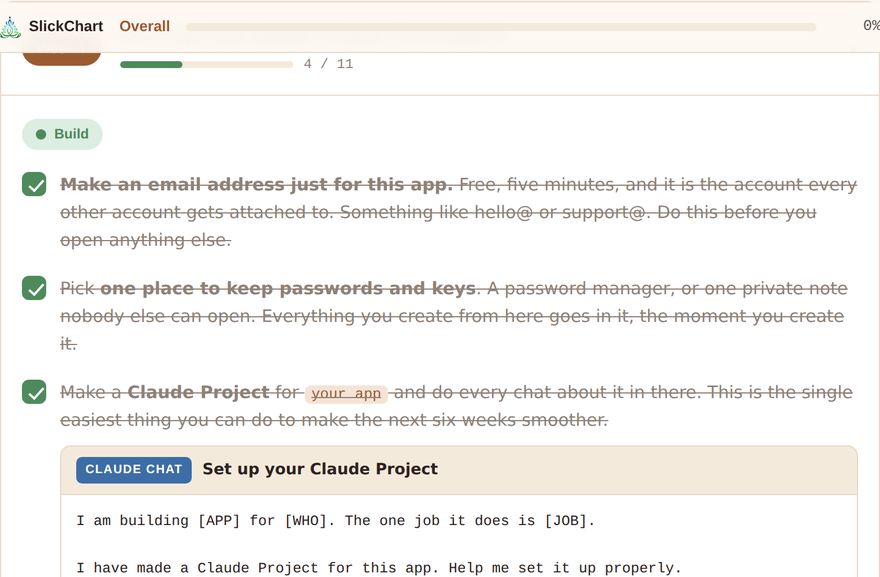
You fill in three boxes once. Your app name, who it is for, and the one job it does. Every prompt on the page then says your app name instead of a blank.
Three things, on one page, for $97
The Master Build Roadmap
Six weeks plus an ongoing section. One page that lives in your own Claude account and is yours to keep.
- Every step, one after the other, with a box to tick.
- Four colour tracks, so nothing gets forgotten.
- Optional steps clearly marked.
- Your progress saves on its own.
- Print it if you like paper.
The 35 prompt library
Built into the steps. Not handed to you as a separate list you have to work out how to use. Writing and testing these on a real build is where most of those hundreds of hours went, and a prompt run in the wrong week is what costs people a month.
- Each one tested on a real build.
- Fills in with your app name on its own.
- Labelled Claude Chat or Claude Code.
- A copy button on every one.
- All gathered in one place too, for when you know what you need.
The 22 minute walkthrough
Me, walking you through the page and the few things that are easy to get wrong.
- How to set the roadmap up and keep it.
- Claude Chat and Claude Code, and why it matters.
- Why the app stores are optional.
- The five things that cost me real time.
- Exactly what to do in your first seven days.
Six weeks, week by week
The weeks are a guide, not a deadline. If one week takes you two, nothing breaks. The strategy is what matters, not the speed.
Set it up, and design it before you build it
Your app email, your accounts, your Claude Project, and a clickable demo you can tap through. All before one line of code.
Make it real and put it live
Claude Code and GitHub, set up once. After that you never drag, download or rename a file again. Then a real web address.
Put something real underneath it
Database, logins, payments, and your keys kept somewhere safe. This is the week you cannot see progress and you are doing the most important work.
Test it properly, then show one person
Claude tests the whole app screen by screen and hands you a list. Plus the account deletion and legal pages both stores ask for.
Brand it, and make it installable
Your whole brand and every graphic from one prompt. Then people can add it to their home screen, where it works like any other app.
The app stores, only if you want them
One prompt checks your app against every rule, writes your listing, and fills in a file for each store. It is marked optional, because it is.
Handle the reviews, then launch
Your founding offer and your sign up page. Forty things to post, from the build you just did. And a plan for launch day.
Keep it running
The renewals, filings and checks that quietly take an app offline if nobody writes them down. Put them in your calendar once.
Optional steps are tagged on the page. You always know what you are allowed to skip.
Claude does the work. You check it.
You never sit staring at an empty chat box trying to work out how to word it. Every hard job on the roadmap already has its prompt written. I tested each one on a real build. They fill in with your app name. And each one tells you whether it goes in Claude Chat or Claude Code.
Here is what you stop having to guess:
Designing it before you build it
- Claude interviews you, one question at a time, until it knows every screen. So your plan is not a guess.
- A clickable demo you can tap through before any code exists.
- That demo turned into a written build plan, in plain words.
Building it for real
- The handoff to Claude Code, with your rules written into the folder. It only ever changes what you asked for.
- The plan read back to you before it writes one line of code.
- GitHub set up so you never drag, download or rename a file again.
- Vercel walked through one click at a time, to a real web address.
- Going back to the last version that worked, in one sentence.
- A database and payments, only when you actually need them.
Making it safe to charge for
- Claude tests the whole app screen by screen. It tries everything a real person does by accident, and hands you a list.
- Fix one thing at a time, with how to check each one yourself.
- The four safety mistakes that cover almost all of the risk.
- Real account deletion, which store reviewers actually test.
The paperwork
- Your privacy policy and terms, written in plain words, put live at real web addresses, with answers that match both store forms.
- Your own state's LLC steps, what each one costs, and the official links. Plus what you should never pay anyone else for.
Brand and stores, without design software
- A whole brand in one prompt. Colours, fonts, voice, and name options with what to check for each.
- Every icon and graphic made at the exact size each store asks for.
- Five store pictures made from your real screens.
- The full submission. It checks your app against every Apple and Google rule. It fixes what it can. It writes your listing. Then it hands you a file for each store with every answer filled in.
- What to say back if you get turned down.
Launch
- Your sign up page.
- Your founding offer, written with no hype.
- Forty things to post, pulled from the build you actually did. You never open the camera wondering what to say.
And the ones you use forever
- Change one thing, and nothing else.
- Make it installable, with the pop up that shows people how to add it to their home screen.
- When something breaks, the exact way to ask so you get a real fix.
- The five part feature prompt, for anything you build after this.
- Six rules that keep your Claude bill down.
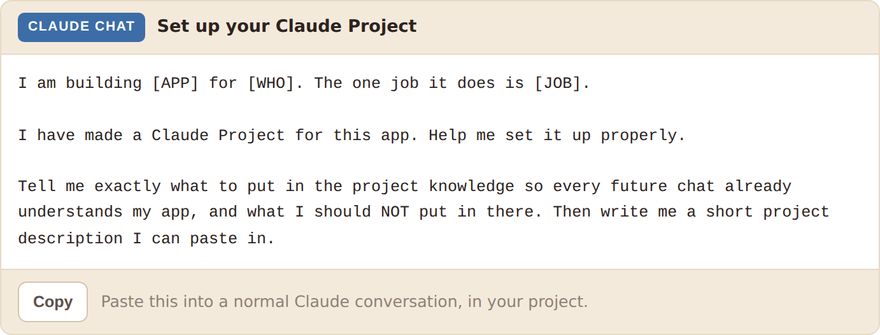
Every prompt says Claude Chat or Claude Code. You never guess which window you should be in. That one thing saves the most common beginner mistake there is.
Open a week and the prompt sits right under the task that needs it. You are not hunting through a separate list to find it.
The step that costs people a month
Nobody tells you this until it has already happened
To put your app on Google Play with a personal account, you have to run a test first. At least 12 people, signed up, for 14 days in a row, actually using it. If one of them drops out, the clock can start over.
A business account skips that rule. But to sign up as a business you need a D-U-N-S number, and that can take up to 28 days to come.
So it has to start in week 1. A whole month before you have any use for it. On the roadmap it sits right there in week 1, on the blue track, with the reason written next to it. That is this whole thing in one example. Not the code. The strategy.
Who this is for
This is for you if…
- You already have an idea. This does not help you find one.
- You know an industry well and you want to build something for it.
- You have never written code and you do not want to learn a language.
- You would rather follow a checklist than look all of this up yourself.
- You can find a few hours a week.
This is not for you if…
- You want someone to build it for you. You still do the work.
- You want live calls or a group. There is neither, on purpose.
- You are already a developer. You will find this basic.
- You want a promise about money. Nobody can give you that.
What building your app actually costs
Not what this costs. What your build costs, so you can decide before you spend anything. Most of it is free, optional, or only matters if you go to the app stores.
| What | Cost | When |
|---|---|---|
| Claude, paid plan | $20 to $100 a month | Day one, for the six-week build. This is your real cost. (The free starter does not need it.) |
| GitHub | Free | Never, for what you need. |
| Vercel hosting | Free | You get a free web address real customers can use. |
| Database | Free to start | Only if your app has to remember things. |
| Stripe | % per sale | Only when money actually moves. |
| Domain name | $12 to $20 a year | Optional. The free address works fine. |
| Apple Developer | $99 a year | Only if you go to the App Store. |
| Google Play | $25 once | Only if you go to Google Play. |
You can get a real, working app live on the web for about the price of your Claude plan. The app stores are optional, and the roadmap says so in writing.
Questions people ask
Do I need to know how to code?
Is this just a list of prompts?
What do I need before I start?
The free starter is different. That one is a single sitting, and a free Claude account handles it, so you can see what this feels like before paying for anything. The six-week build is a different amount of work, and that is where a paid plan matters.
Is this a course with modules and hours of video?
Do I have to put my app in the app stores?
How long does it really take?
What if I get stuck?
Why is it only $97?
Do I get updates?
Will this make me money?
How do I get access after I pay?
Can I get a refund?
What this actually looks like on a Tuesday
It is nine at night. The house is quiet. You open one page, and you type a sentence describing the thing you want, in your own words, the way you would explain it to someone standing there.
Then you watch it appear.
That is the loop. You will run it a few dozen times over six weeks, and the page tells you which sentence to type next and what to check when it comes back. Nobody has to be clever. You just have to keep going. At the end of it, the thing exists.
One page. Six weeks. The idea stops being an idea.
You have had it a while. You have described it to people. Maybe you priced up having someone build it and quietly closed the tab. The building is not the wall anymore.
Instant access, the second you pay.
Start with a clickable demo, free.
No hard feelings if $97 is not right now. There is a free starter that turns your idea into a clickable demo of your app, on your phone, in about seventy minutes. No card, no trial, no catch, and a free Claude account is enough to do it. That is the difference between the two: the build above is where a paid Claude plan earns its keep, and this is not.
It is day one of the six weeks above, and it shows you exactly where the wall is, which is the part nobody warns you about.
Get the free starter →